

Publishing content is not the final step. Search trends change, competitors improve their pages, and search engine algorithms continue to evolve. Regular content optimization helps maintain rankings, improve visibility, and keep your content useful.
This content optimization checklist helps you review SEO content, identify improvement opportunities, and maintain quality across the content on your site. A free Excel and PDF version is included to simplify your optimization workflow.
In this guide, you will learn how to identify pages that need optimization, improve content for search, and keep your content competitive over time.
What Is a Content Optimization Checklist?
A content optimization checklist is a practical guide used to review and improve content before and after publishing. It helps ensure important areas like search intent, content quality, on-page SEO, and user experience are covered.
A checklist creates a consistent process for optimizing SEO content, including blog posts and other content on your site. It helps teams review important details without replacing their broader content strategy.
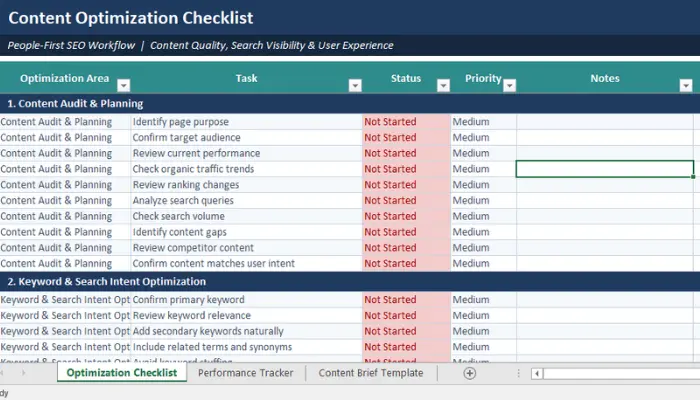
Unlike a content creation workflow, which focuses on planning and publishing, optimization continues after publishing through updates, performance reviews, and improvements to existing content.
Expert Tip: A checklist supports your strategy, it does not replace it. It helps ensure important optimization steps are completed at the right time.
How to Identify Pages That Need Content Optimization?
Not every page needs an update at the same time. The best approach is to use performance data to find content that has lost visibility, missed opportunities, or no longer matches what users are looking for.
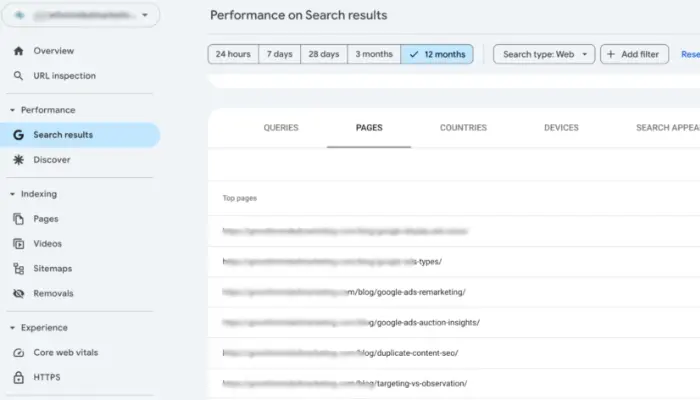
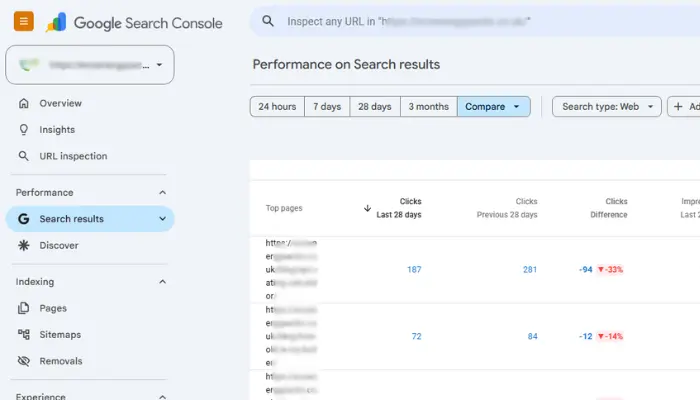
Tools like Google Search Console and Google Analytics can help identify pages with declining traffic, lower engagement, and ranking changes. These insights help you decide where content optimization will have the biggest impact.
Review Organic Traffic Trends
A drop in organic traffic is often a sign that a page needs attention. Review pages that previously performed well but have gradually lost visitors.
The reason may be outdated information, stronger competitors, changing search behavior, or a mismatch with current user intent. Updating these pages can often improve performance faster than creating new content from scratch.
Check Declining Keyword Rankings
Ranking drops may indicate that your content no longer fully matches the search query. Review your target keyword, related terms, and whether the page provides enough value compared with high-ranking content.
Keyword research tools can help identify gaps and opportunities.
Analyze Low Click-Through Rates (CTR)
A page may appear in search results but receive fewer clicks because the titles and descriptions do not clearly communicate its value.
Improving the title tag and meta description can help attract more relevant visitors.
Look for Outdated or Thin SEO Content
Content that lacks depth or contains outdated information may struggle to compete. Check pages that need updated examples, missing subtopics, clearer explanations, or more relevant information.
The goal is not to add more words but to improve the quality and usefulness of the content.
Review User Experience and Engagement Signals
Review readability, mobile usability, page speed, and engagement signals such as bounce rate. A responsive, mobile-first experience helps users access content easily and improves the overall page experience.
Expert Tip: Start optimization with pages that already have ranking potential. Improving existing content with traffic history, backlinks, or search visibility often delivers better results than starting from zero.
How to Use This Content Optimization Checklist?
A content optimization checklist works best when it becomes part of your regular SEO workflow. It helps you review important details at different stages without replacing your broader content optimization strategy.
Use it before publishing new pages, while improving existing SEO content, and after making updates to measure results.
Before Publishing New Content
Before publishing, check that your content matches the target keyword, search intent, and user expectations.
Review key areas such as:
- Content structure
- On-page SEO
- User experience
- Relevant keywords
This helps ensure your content is ready for users and search engines.
While Optimizing Existing Content
For existing content, focus on improving what already works instead of rewriting everything. Review ranking changes, missing subtopics, internal links, and whether the content still matches the current search query.
Adding updated information and unique perspectives can improve the quality and relevance of the page.
After Updating and Republishing Content
Optimization does not end after making changes. Monitor how the updated page performs over time. Check changes in:
- Rankings
- Organic traffic
- Search impressions
- User engagement
This data helps you understand whether your updates improved the quality and relevance of the content.
Expert Tip: Use the checklist as a quality control process. Your strategy decides what content to create, while optimization helps each page perform better over time.
SEO Content Optimization Checklist
Not every optimization task has the same impact. Start with the areas that directly affect how users interact with your content and how search engines understand the page.
A balanced approach to SEO content optimization focuses on relevance, quality, usability, and technical performance.
Keyword & Search Intent Checklist
A strong page starts with understanding what users are searching for. Before optimizing, confirm that your target keyword matches the user intent behind the query.
Review:
- Use the primary keyword naturally in important areas
- Add relevant keywords and related terms where they fit
- Avoid keyword stuffing that affects readability
- Cover important entities and subtopics connected to the main topic
Keyword research helps you understand user needs, but the goal is not to repeat phrases. The content should provide a complete answer that helps both users and search engines understand the topic.
Content Quality Checklist
Content quality is one of the most important parts of optimization. A page should solve the reader’s problem clearly instead of simply targeting a keyword.
Focus on:
- Answering the user’s question directly
- Adding useful depth without unnecessary information
- Updating outdated details
- Including original examples or practical insights
- Showing experience, expertise, authoritativeness, and trustworthiness
Great content provides genuine value and helps readers make better decisions.
On-Page SEO Checklist
On-page SEO helps search engines understand the structure and purpose of your content.
Review these elements:
- Optimize the SEO title and title tag
- Write a clear meta description
- Use a logical H1/H3 heading structure
- Create simple URLs
- Improve internal linking between related content
- Add trustworthy outbound links when they support the topic
These elements improve both search visibility and user experience by making the page easier to understand.
Visual Content Optimization Checklist
Visual content can improve understanding, especially for complex topics. Use visuals when they add value rather than adding images only for SEO purposes.
Consider:
- Adding relevant images, screenshots, or infographics
- Using descriptive image file names
- Writing useful alt text
- Compressing images for faster loading
- Adding diagrams, tables, or examples where they improve clarity
Helpful visuals can make written content easier to consume and improve engagement.
User Experience Checklist
A page should be easy to read, navigate, and use on any device.
Review:
- Improve readability with clear formatting
- Use short paragraphs where they improve scanning
- Add tables only when they simplify comparisons
- Improve page navigation
- Check mobile responsiveness
- Improve page speed
A good user experience supports content performance because visitors are more likely to stay, understand, and engage with useful information.
Technical SEO Checklist
Technical issues can prevent high-quality content from reaching its full potential. Make sure search engines can properly access and understand your pages.
Check:
- Confirm pages are indexable
- Add schema markup where appropriate
- Fix broken links
- Review Core Web Vitals
- Check canonical tags when needed
Technical SEO supports your written content by removing barriers that affect crawling, indexing, and performance.
Expert Tip: Prioritize improvements based on impact. Fixing search intent, content quality, and usability issues usually creates more value than making small SEO changes that do not improve the reader’s experience.
Content Optimization Checklist for Existing Content
Existing content often has more potential than a new page because it may already have rankings, backlinks, and search visibility. A content refresh focuses on improving what is already published instead of creating a completely new piece of content.
Before making updates, review performance data, search queries, and competing pages. The goal is to improve relevance, accuracy, and user experience while keeping the original value of the content.
Update Statistics and Examples
Outdated information can reduce trust and affect content quality. Review older pages regularly and replace expired statistics, examples, screenshots, or recommendations with current information.
Updated examples also help demonstrate practical knowledge and make the content more useful for readers.
Expand Missing Topics
A page may lose rankings because it does not fully answer the user’s query. Review related searches, competitor content, and user questions to find missing subtopics.
Add information that improves the reader’s understanding instead of adding extra sections only to increase word count. The focus should be on creating a more complete resource that covers the topic naturally.
Refresh Internal Links
Internal linking helps users discover related content and helps search engines understand the relationship between pages.
When updating existing content, check whether:
- New related content should be linked
- Old links need replacement
- Important pages need stronger internal connections
A strong linking structure helps show that your content is related across different topics on your website.
Improve Content for Current Search Intent
Search intent can change over time. A page that matched a user’s needs when published may not provide the same value today.
Review whether your content still matches what people expect from the search query. For example, users may now prefer comparisons, step-by-step guidance, updated examples, or clearer explanations.
Optimizing for current user intent helps your content remain relevant in changing search results.
Recheck Rankings After Optimization
Content optimization does not end when updates are published. Monitor performance to understand whether your changes improved results.
Review:
- Keyword rankings
- Organic traffic
- Search impressions
- Click-through rates
- User engagement
Regular reviews help you adapt to algorithm updates and maintain content performance over time.
Expert Tip: Treat existing content as an ongoing asset. Regular updates can help maintain visibility, improve rankings, and keep your website’s content accurate as topics evolve.
Common Content Optimization Mistakes to Avoid
Content optimization can improve rankings and visibility, but the wrong approach can reduce the quality of your content. Many websites focus too heavily on search engines and forget that real users are the ones reading, clicking, and taking action.
Avoiding these common mistakes helps create content that supports both SEO performance and user experience.
Optimizing for Keywords Instead of Users
Keywords help search engines understand a topic, but they should not control the way content is written. A common mistake is forcing the same keyword throughout a page in an attempt to improve rankings.
This creates unnatural content and can hurt readability. Instead, focus on answering the user’s question clearly. Use the primary keyword, related terms, and natural language where they support the topic.
Ignoring Search Intent
Targeting the right keyword is not enough. Your content must also match what the user expects to find. A page can rank poorly when it provides the wrong type of information.
For example, a user searching for a product comparison may not find value in a general educational article. Before creating or updating content, review the search results and understand the user intent behind the query.
This helps you create content that solves the actual problem.
Publishing Without Reviewing On-Page SEO
Even valuable content can miss ranking opportunities if basic on-page SEO elements are ignored.
Before publishing, review important elements such as:
- Title tag
- Meta description
- Heading structure
- URL format
- Internal linking
These elements help search engines understand your content and help users decide whether your page matches their needs.
Forgetting Visual Content and User Experience
Strong written content is important, but the overall page experience also matters. Ignoring visual content, mobile usability, or readability can make valuable information harder to consume.
Use helpful visuals such as screenshots, diagrams, or infographics when they improve understanding. Also make sure your responsive pages load properly, work on mobile devices, and provide clear navigation.
Treating Optimization as a One-Time Task
Publishing content does not mean the optimization process is finished. Search trends change, competitors improve their pages, and user expectations evolve. Regular reviews help maintain content quality and keep your pages competitive.
A consistent optimization process supports better results across your website, whether you are working on content marketing, digital marketing, or SEO campaigns.
Expert Tip: The best optimization approach is continuous improvement. Focus on making each update more useful for readers instead of making changes only to influence search engine algorithms.
Free Content Optimization Checklist (Excel + PDF)
To make the optimization process easier, we created a free content optimization checklist that you can use when reviewing new and existing SEO content. The downloadable resources are available in two formats:
Excel version includes:
- Optimization task tracking
- Page review sections
- SEO checklist items
- Content update progress
Printable PDF includes:
- Quick content review checklist
- Key SEO optimization steps
- Easy reference during audits
Use the Excel file when managing multiple pages and the PDF when you need a simple checklist while reviewing individual content.
Download the free content optimization checklist Excel and content optimization checklist PDF versions to organize your workflow and keep your content optimization process consistent.
Recommended Tools to Optimize Your Content
The right tools can make content optimization more efficient by helping you analyze keywords, improve readability, identify technical issues, and monitor performance.
Use tools based on the specific task you need to complete rather than relying on one platform for everything.
| Task | Recommended Tool |
|---|---|
| Keyword Research | Semrush/Ahrefs |
| Content Optimization | Surfer SEO |
| Readability | Hemingway Editor |
| Technical SEO | Screaming Frog |
| Performance Tracking | Google Search Console |
These tools support different parts of the optimization process. Keyword research platforms help identify opportunities, content optimization tools assist with improving topic coverage, and technical SEO tools help ensure search engines can properly access and understand your pages.
Looking for a detailed comparison? Explore our guide to the Best SEO Content Optimization Tools.
Final Thoughts
Content optimization is an ongoing process, not a one-time task. Regularly reviewing and improving your pages helps maintain rankings, improve user experience, and keep your content useful as search behavior changes.
Use this checklist whenever you publish new content or refresh existing pages to ensure important SEO and quality checks are completed. Download the Excel and PDF versions to make your optimization workflow easier.
For a broader planning approach, explore our Content Optimization Strategy guide, and check our Best SEO Content Optimization Tools resource for choosing the right software for your workflow.