By Olivia Harper. Researched from Character AI’s official How Do I Verify My Age guide and Age Assurance FAQ.
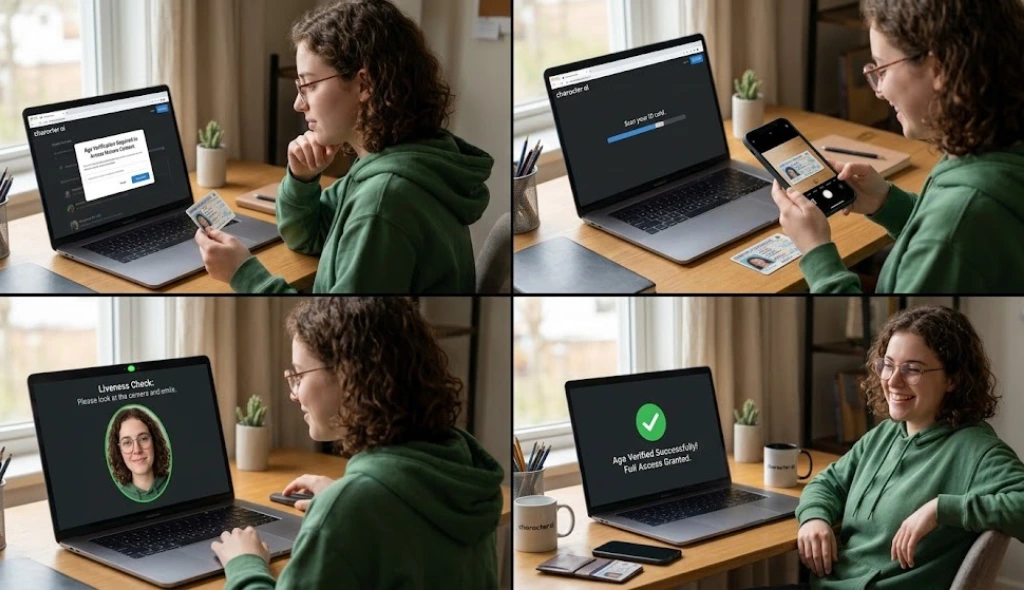
Verifying your age on Character AI takes three steps and about a minute if your camera cooperates. Open the Settings menu, tap Advanced, then select Verify Age. A quick selfie verification step usually settles the question, so most people finish without touching an ID at all.
This guide covers each step in order. Before starting, it helps to understand what verifying your age on Character AI does and what changes after the check is completed. You will learn where the button lives, how to pass the selfie check on the first attempt, and what happens if Persona asks for a document instead.
Where to Find Age Verification in Settings
The button sits in one place regardless of device. Open Settings, then tap Advanced, and select Verify Age near the bottom of that menu. The web version and the mobile app use the exact same path, so switching devices will not change what you see.
Some accounts see this step without searching for it. Character AI shows a Verify identity prompt automatically for certain users, and tapping it skips the settings menu entirely.
An outdated app hides the option sometimes. If Advanced does not list Verify Age, check the app store for a pending update and install it before trying again.
A Not now button appears next to the prompt too. Tapping it postpones the check without canceling your account, though the restricted experience stays active until you come back and finish.
How the Selfie Step Works
Persona reads your face, not a photo you already have saved. The system opens your camera directly and asks for a live capture, so pulling an image from your gallery will not work.
Camera permissions need to be active first. If Character AI has never used your camera before, your phone will ask for that access before the capture screen loads.
The scan itself relies on face based age estimation. Persona’s model studies your features against patterns tied to different ages, then returns a confidence score behind the scenes rather than an exact guess.
Most results land within a few minutes. Processing time typically runs one to three minutes, and a success message confirms your age once the check clears.
Verifying Without an ID
Most people never touch a document for this process. The selfie step alone confirms age for most adult users. Skipping straight to ID upload is not necessary, and it is not even offered as a first option.
That said, plenty of low quality guides suggest something risky instead. They point people toward third party verifier sites or modded app versions that claim to remove the check entirely without any selfie or document.
Skip those tools. Handing your Character AI login to an unofficial site risks credential compromise, and a modded APK can carry malware disguised as a bypass. Neither method actually satisfies the law behind this system, so accounts caught using them risk suspension on top of the security risk.
Sticking with the real selfie step is faster anyway. It takes less time than downloading and trusting some third party app, and it keeps full access legitimate rather than borrowed. If you would rather explore other platforms, you can also compare some of the best Character AI alternatives.
When You’ll Be Asked for an ID Instead
A blurry photo or bad angle sends the process to a backup step. When Persona cannot reach a confident answer from your face alone, it asks for a government ID instead.
Either a driver’s license or a passport works for this part. Character AI accepts either document type as long as the photo and birthdate are legible when scanned.
Upload happens through a secure upload form hosted by Persona rather than Character AI itself. The company has stated it never opens or stores that document directly, so the file stays inside Persona’s system during review.
Expect the same short wait either way. ID review usually finishes about as fast as the selfie step, though a small number of cases take longer if the photo needs a manual look.
Tips to Pass on the First Try
- Face a light source: Sit facing a window or lamp instead of having it behind you. A backlit face confuses the age estimate more than anything else.
- Skip beauty filters and heavy makeup: Natural lighting paired with a bare face gives Persona’s model the clearest data to work with.
- Remove sunglasses, hats, and face coverings: Pull hair away from your forehead and cheeks too, since the system needs a full, unobstructed view of your face.
- Hold the phone at eye level: An awkward angle from above or below can shift how old a face looks to the estimation model.
FAQ’s
How long does verification take?
Most selfie checks finish in under three minutes. ID review takes about the same amount of time unless Persona needs a manual look at the document.
Can you retry after a failed attempt?
Yes. A failed selfie lets you try again right away, and better lighting usually fixes the problem on the second attempt.
Does verifying cost anything?
No. The entire process is free, including the ID step if a selfie does not settle the question.
Will you need to verify again later?
Not under normal circumstances. Once Persona confirms your age, you get a success confirmation, and the account keeps that status unless something later flags it again.
That covers the entire process from start to finish. Follow the lighting tips above and most accounts clear the selfie step without ever seeing the ID upload screen.