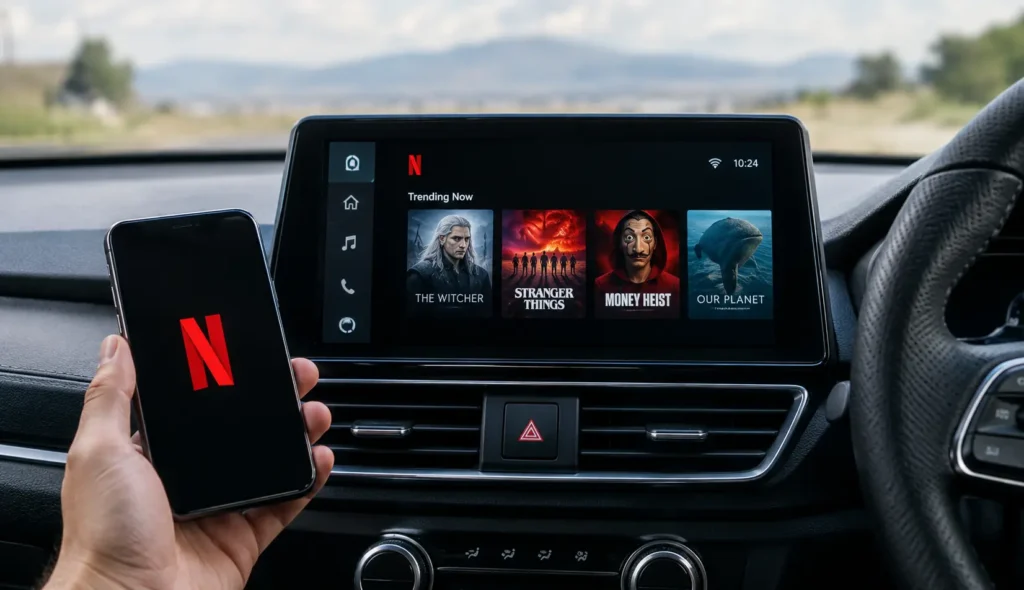
Thirty minutes at an EV charger. A long wait in the school pickup line. Two restless kids an hour into a road trip. Sooner or later, almost every driver goes looking for Netflix on Android Auto, and almost everyone finds the same thing. Nothing.
That isn’t a bug. Android Auto blocks video on your car’s infotainment system on purpose, and Netflix has never released an Android Auto app. That is finally starting to change, with Google rolling out parked video later in 2026.
We went through Google’s official Android for Cars announcements and Netflix’s own help pages to separate what works from what doesn’t, so you can watch Netflix in the car the right way, which means parked or from the passenger seat.
Quick answer
There is no official Android Auto Netflix app as of October 2026. Google will start rolling out parked video to compatible cars later this year for phones running Android 17 or newer, beginning with apps like YouTube, but Netflix hasn’t been announced. Until then, your options are a mirroring app, an Android adapter box, or a tablet for passengers. Never watch while driving.
Can You Watch Netflix on Android Auto?
Not officially. As of October 2026, you can’t watch Netflix on Android Auto, because there is no Netflix Android Auto app to download. Android Auto only runs apps from approved categories, such as music, podcasts, navigation, messaging, and EV charging finders, and all of them are built to be used safely while you drive.
Video is left out on purpose. Google treats it as driver distraction, and the numbers back that up. According to NHTSA, 3,208 people were killed in crashes involving distracted drivers in 2024. A movie on the dashboard pulls your eyes off the road far longer than a song or a map does.
There is a legal side too. According to the Governors Highway Safety Association (GHSA), 49 states ban texting and 33 states ban holding a phone while driving, and some states also restrict any video screen the driver can see. Rules for parked cars vary, so check your state’s law before you watch anything on the car screen.
Is Google Adding Netflix to Android Auto?
Not yet, but the door is finally opening. In May 2026, Google announced that Android Auto users will be able to watch videos while parked for the first time. The feature “will start rolling out to compatible vehicles later this year,” and it needs a phone running Android 17 or newer. Google says apps like YouTube will play smooth 60fps HD video on supported car screens.
Netflix wasn’t part of that announcement. Google only named YouTube, and it hasn’t said it will add Netflix to Android Auto itself. That decision belongs to Netflix, which would need to adapt its app and submit it for cars.
Cars with Google built-in are a separate story. Google is working with carmakers on audio-only listening for video apps while driving, so sound keeps playing while the picture turns off.
So when will you be able to play Netflix on Android Auto? Watch for two things, an Android Auto update that turns on parked video in your car, and an announcement from Netflix itself.
How Do You Put Netflix on Your Car Screen Right Now?
Until parked video arrives, there are four ways to watch Netflix on the car screen or near it. They differ a lot in cost, effort, and whether Netflix actually plays, so the best device to watch Netflix in the car depends on what you value most.
| Method | Cost | Works with Netflix? | Setup | Main risk |
|---|---|---|---|---|
| Mirroring app (CarStream, AA Mirror) | Free or low | Often no, Netflix may show a black screen | Hard, unofficial install | Unverified apps that can break after updates |
| Android adapter box | Medium | Usually yes, it runs the real Netflix app | Easy, plugs into the USB port | Needs a data plan or hotspot, can lag |
| Aftermarket Android stereo | High | Usually yes, if it has the Play Store | Hard, often needs professional install | Replaces your factory head unit and its features |
| Tablet with headrest mount | Low if you own a tablet | Yes, using the official app | Easy | Passengers only, mount must be secure |
If you just want to know how to watch Netflix in the car with the least hassle, a passenger tablet wins. If it has to be on the car screen, an adapter box is the most reliable choice today. The next sections explain each option and its limits.
How Do You Mirror Your Screen to Android Auto?
Mirroring apps copy your phone’s screen onto the car display, so whatever plays on the phone, including Netflix, shows up in the car. This kind of car screen mirroring isn’t something Google offers. It comes from independent developers, and the best known apps are CarStream, AA Mirror, and Screen2Auto.
You won’t find them in the Play Store, because Google doesn’t allow video apps on Android Auto. Instead, people install them with unofficial tools such as AAAD (Android Auto Apps Downloader) or AAStore. A common example is using AAAD to get CarStream.
To mirror your phone to Android Auto this way, the process usually looks like this. You turn on Android Auto dev mode by tapping the version number in Android Auto settings, enable Unknown sources in the developer settings, install the app with one of those tools, and then open it from the app list on the car screen.
Exact steps change often as Android Auto updates, so treat any guide, including this one, as a general outline rather than a promise.
What Are the Risks of Mirroring Apps?
Mirroring apps can work, but they come with real trade-offs.
- Apps from outside the Play Store aren’t checked by Google, so you’re trusting an unknown developer with access to your phone.
- An Android Auto update can break them overnight, sometimes for weeks.
- Netflix often plays as a black screen, because of how it protects its videos (more on that below).
- If Android Auto stops working properly after you try one, our guide to fixing Android Auto not working walks you through a reset.
Why Is Netflix Blocking Screen Mirroring?
If you’ve ever wondered why you can’t screen mirror Netflix in the car, the answer is copy protection. Netflix protects its shows and movies with DRM (digital rights management), which stops the video from being captured or copied to another screen.
Mirroring apps work by copying your phone’s screen, so Netflix often blocks the picture. The result is the classic black screen with sound, where you hear the show but see nothing.
So does Netflix allow screen mirroring at all? Only partly. Netflix’s own help center says it “may not support certain devices or mirroring apps,” and that casting or mirroring is only available on the Standard or Premium plans. If you’re on the plan with ads, casting and mirroring aren’t included.
Netflix has also narrowed casting from phones to a short list of supported devices, such as older Chromecasts. In other words, Netflix is limiting how its app shares the screen, not expanding it, which is why mirroring in the car is getting less reliable over time.
Can an Adapter Box Play Netflix in Your Car?
Yes, and it’s the most reliable way to get Netflix on the car screen today. These “AI boxes” are small Android computers that plug into your car’s Android Auto or CarPlay USB port. Instead of mirroring your phone, they run their own apps, including the real Netflix app from the Play Store.
Don’t confuse them with a regular wireless adapter. A wireless adapter only removes the cable from Android Auto. It doesn’t run apps, so it won’t add Netflix on its own.
Before buying any Netflix car adapter, check five things.
- It works with your car’s built-in wired Android Auto or CarPlay.
- It includes the Play Store, not just a few preloaded apps.
- It runs a recent Android version.
- It has a SIM card slot, or you can connect it to your phone’s hotspot.
- The seller offers returns, because screen lag and video quality vary by car.
How to Set One Up
- Plug the box into the USB port your car uses for Android Auto or CarPlay.
- Wait for its home screen to appear on the car display.
- Connect it to your phone’s hotspot or insert a SIM card.
- Open the Play Store, install Netflix, and sign in.
- Start playback only when the car is parked.
Treat any car streaming device like this as a parked or passenger tool.
What’s the Safest Way to Watch Netflix in the Car?
The safest setup keeps Netflix away from the driver entirely. Put a phone or tablet in a headrest mount so passengers can stream Netflix from the back seat, and leave the dashboard screen for maps and music. It uses the official Netflix app, needs no hacks, and works in any car.
On a road trip, download episodes at home on Wi-Fi. Tap the download button next to a show in the Netflix app, and it plays offline without using mobile data. Streaming adds up fast. Netflix estimates up to 0.3 GB per hour on Low quality, up to 1 GB on standard definition, and up to 3 GB in HD.
If you’re the driver and want to watch TV in the car, do it only when you’re fully parked, such as at an EV charger or while waiting for someone. Even then, local rules on screens the driver can see still apply.
FAQ’s
Can I watch TV on my Android Auto?
Android Auto doesn’t run any TV or video apps today, including YouTube TV, Disney+, and Prime Video. That should change once Google’s parked video feature reaches your car, as explained above.
Does Netflix work with wireless Android Auto?
Wireless only replaces the cable, so Netflix is no more supported than it is over USB. Mirroring apps face the same limits either way.
Does YouTube work on Android Auto?
YouTube is the first app Google named for parked video, so it should arrive before Netflix.
Can you watch Netflix on Apple CarPlay?
No. There’s no Netflix app for CarPlay, and Netflix says it doesn’t support AirPlay, so the same workarounds and limits apply.
Sources
- Android Developers Blog: Android for Cars (May 2026)
- Android Developers Blog: Android for Cars at I/O 2025
- Netflix Help: Cast or mirror from a mobile device
- Netflix Help: Black screen with sound
- Netflix Help: Control how much data Netflix uses
- NHTSA: Distracted Driving
- GHSA: Distracted driving laws by state
Last updated: October 2026