
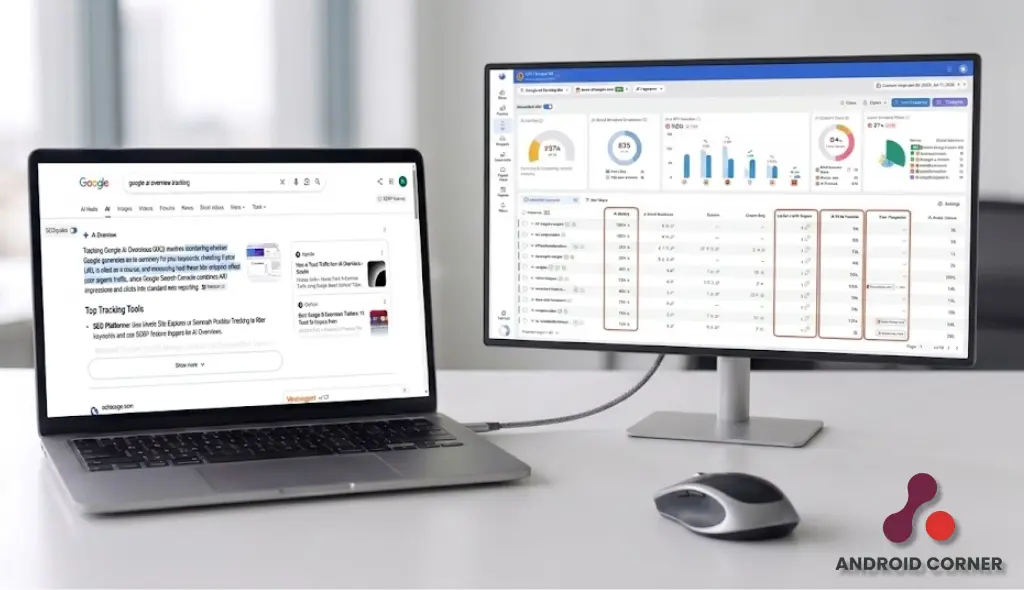
You can track Google AI Overviews with Google Search Console or a paid third-party tool. Search Console shows first-party performance data from Google, while specialist platforms can reveal which queries trigger an Overview, which pages receive citations, and which competing websites appear alongside them.
A small company may only need to know which pages appear. An agency may need saved results, rival citations, and separate client reports. Paying for extra data only makes sense when someone will use it.
Rankings, brand mentions, and citations do not tell the same story. We explain those differences in How AI Search Monitoring Works. This guide stays focused on tools built for tracking Google AI Overviews rather than software covering every AI answer platform.
Google AI Overview Tracking Tools at a Glance
Some platforms show data directly from Google, while others check selected queries and record citations, competing sources, and changes over time. Use this table to narrow the list before reviewing each tool in detail.
| Tool | Best for | Citation tracking | Historical data | Pricing |
|---|---|---|---|---|
| Google Search Console | Free first-party reporting | Appearing URLs; no query-level citation log | Yes | Free |
| SE Ranking | Keyword and citation tracking | Yes | Yes | Plan-dependent |
| Ahrefs Brand Radar | Large-scale citation research | Yes | Yes | Plan-dependent |
| Advanced Web Ranking | Agencies and local tracking | Yes | From tracking start | Plan-dependent |
| Otterly AI | Simple recurring checks | Yes | Yes | Plan-dependent |
| Semrush | Existing Semrush workflows | Varies by report and plan | Yes | Plan-dependent |
Plans and usage limits were checked in August 2026 and may change.
What Should an AI Overview Tracking Tool Measure?
Confirmation alone is not enough. The software should show what Google cited, what changed over time, and whether another source gained the same searches.
Citation and Cited-Page Data
Start by checking what the software counts. Some platforms record a brand mention, others detect a linked domain, and stronger options show the exact page Google referenced.
That difference matters. A visibility score may tell you that your site appeared, but a cited URL shows which article or landing page earned the mention. It also reveals whether competing sources appeared in the same result.
A SaaS company, for example, may notice that a rival keeps appearing for product-comparison searches. That gives the team something concrete to compare: page format, supporting evidence, freshness, and the search question each source answers.
Historical and Competitor Trends
One result is a snapshot, not a trend. A citation may disappear the following week, return later, or move to another page. Check how often the service refreshes its records, how long it keeps them, and whether it compares the same searches against the same competitors.
Daily checks suit news sites, retailers, and active campaigns. A smaller B2B site may only need weekly updates. The aim is to spot a pattern before changing content.
Coverage and Tracking Limits
Low pricing can look attractive until you check what the plan actually includes. Some packages restrict the number of tracked queries, countries, languages, devices, or update cycles.
Review whether the platform supports your main markets and whether it checks desktop, mobile, or specific locations. A local service company needs different coverage from a global software brand.
Work out the real allowance before comparing prices: tracked searches × markets × devices × refreshes. A cheap plan can become restrictive once those limits are applied.
Reporting and Workflow
Reports should not take hours to prepare. Before choosing a tool, check whether it can send scheduled updates, export data, create separate client projects, or connect with the dashboard your team already uses.
For example, a small company may only need one monthly report. An agency working with dozens of clients may need automatic reports, separate accounts, bulk exports, and control over what staff and clients can view.
This part is easy to miss during a free trial. A tool may collect useful data but still create extra work when its reporting options are limited.
How We Evaluated These Tools
We reviewed official product pages, help centres, and public pricing in August 2026. The comparison covers confirmed Google AI Overview support, citation detail, stored data, competitor views, market coverage, reports, limits, and cost.
We did not rate interface quality, ease of use, or data accuracy without access to an active account or trial.
No third-party platform can access Google’s internal ranking or AI systems. Its reports come from searches, prompts, or datasets collected outside Google.
Best Tools to Monitor Google AI Overviews
Each option below serves a different type of company. The notes focus on what the platform tracks, where it works well, and what buyers should check before subscribing.
1. Google Search Console
Google Search Console provides first-party data from Google. Its generative search report can show impressions, appearing pages, countries, devices, and changes by date.
- Best for: Website owners who need free first-party data
- What it tracks: Impressions, pages, countries, devices, and performance over time
- Important limitation: No query-level citation log or detailed competitor comparison
- Pricing: Free
- Recommendation: Start here before paying for another service
2. SE Ranking
SE Ranking checks selected queries across Google AI Overviews and other answer platforms. It records brand mentions, links, competing sources, and changes over time.
Its search-volume data also helps users judge whether a tracked query has enough demand to matter.
- Best for: Marketers tracking keywords and cited pages
- What it tracks: AI Overview appearances, links, mentions, competitors, and history
- Important limitation: The number of tracked prompts and updates depends on the chosen package or add-on
- Pricing: Paid plans, AI features may cost extra
- Recommendation: A practical pick for current SE Ranking customers
3. Ahrefs Brand Radar
Ahrefs Brand Radar searches a large collection of AI responses. It can uncover cited domains, individual pages, brand mentions, competing companies, and topic patterns.
- Best for: Publishers, enterprise teams, and large research projects
- What it tracks: Mentions, citations, cited pages, competitors, and custom prompts
- Important limitation: Its large dataset may cost more than a small keyword list justifies
- Pricing: Paid Ahrefs access; cost depends on the selected package
- Recommendation: Choose it when broad citation research matters more than simple checks
4. Advanced Web Ranking
Advanced Web Ranking places standard Google results and AI Overview data inside the same project. It supports desktop, mobile, countries, and custom locations.
- Best for: Agencies and companies tracking several locations
- What it tracks: Overview appearances, cited sources, devices, markets, and history
- Important limitation: Historical records begin when tracking starts, and frequent checks use more keyword units
- Pricing: Paid plans based on usage
- Recommendation: Consider AWR when local tracking and client reports are priorities
5. Otterly AI
Otterly monitors questions selected by the user. It records brand mentions, links, rival appearances, and changes across repeated checks.
- Best for: Solo marketers and small teams
- What it tracks: Prompts, brand mentions, citations, competitors, and historical movement
- Important limitation: It does not cover technical audits, backlinks, or full keyword research
- Pricing: Paid plans based on prompt allowances and add-ons
- Recommendation: Consider it when you have a defined prompt list and do not need a full SEO suite
6. Semrush
Semrush shows AI Overview appearances through its existing search tools. Its separate AI products add prompt checks, cited-page reports, competitor data, and past performance.
- Best for: Companies already using Semrush
- What it tracks: AI Overview appearances, citations, prompts, competitors, and history
- Important limitation: Basic AIO data and deeper prompt or citation reports may sit in different products or plans
- Pricing: Paid subscription, AI packages may be billed separately
- Recommendation: Check what your current plan includes before buying an extra tool
Readers considering ZipTie can read our ZipTie AI Search Analytics review for a closer look at its features and limits.
Is Google Search Console Enough?
Search Console can answer a basic question: are your pages appearing in Google’s generative results? It also shows the pages, countries, devices, and dates behind that visibility. Since access rolled out gradually, some properties may not see the report yet.
When Search Console May Be Enough
It works well when you mainly want to:
- Review your own site’s performance
- Find pages appearing in generative search results
- Compare countries and devices
- Follow changes over time
- Prepare a simple internal report
When a Paid Tracker Adds Value
Paid software becomes more useful when you need to follow chosen queries, find exact cited URLs, compare competing sources, save past responses, check specific locations, receive alerts, or prepare reports for several clients.
For example, Search Console may show that a product page gained impressions. A specialist platform may reveal which search triggered the result, which rival pages appeared beside it, and whether the citation remained visible during later checks.
Search Console reports activity recorded by Google. Third-party services run and record selected searches using their own methods. The two can work together, but their figures should not be compared as though they measure the same thing.
Which Tool Fits Your Business?
Match the software to the work it must handle. A freelancer checking five searches has little reason to buy the same setup as an agency preparing reports for twenty clients.
| Business type | Recommended starting point | Main reason |
|---|---|---|
| Freelancer | Search Console or Otterly AI | Affordable and easy to manage |
| Small business | SE Ranking | Useful keyword and citation detail |
| SEO agency | AWR or SE Ranking | Supports multiple projects and regular reporting |
| Publisher | Ahrefs Brand Radar | Handles broader citation and topic research |
| Existing Semrush customer | Semrush | Keeps search and AI data in one account |
| Enterprise | Shortlist by API and data needs | Requirements differ by scale and internal controls |
Size alone should not decide the purchase. For example, a small ecommerce store tracking thousands of product searches may need stronger coverage than a large company watching only a few branded queries.
What to Check Before Paying for a Tool
A low monthly price can hide weak coverage or strict usage limits. Check these points before you subscribe:
- Citation detail: Does the platform show the exact page Google referenced, or only the domain name?
- Coverage: Can it check the countries, languages, devices, and locations that matter to your site?
- Refresh rate: Does it collect new data daily, weekly, or only when you run a check?
- Reporting: Can you export the results or send them to an existing client dashboard?
- Total cost: How many keywords, prompts, projects, users, locations, and updates does the plan include?
Run the same test across every shortlisted platform. Use one keyword set, country, device, competitor list, and date range. This gives you a fairer comparison than watching separate product demos built around different data.
Final Thoughts
Start with the missing information, not the longest feature list. If Search Console already answers your reporting question, keep it. Pay for another service only when you need query-level citations, rival-source tracking, local checks, or client reports.
Test two candidates with the same searches and dates. Keep the one that gives clearer evidence with less manual work.
Readers who also want to track ChatGPT, Gemini, Perplexity, Claude, and other platforms can explore our guide to the Best AI Search Monitoring Tools.
FAQ’s
Can Google AI Overviews Be Tracked?
Yes. Search Console reports first-party visibility, while outside services record selected searches, cited URLs, and competing sources. Use them for different jobs rather than expecting their numbers to match.
What Is the Best Google AI Overview Tracking Tool?
There is no single winner for every company. Search Console is the free starting point. SE Ranking and AWR suit keyword or agency work, Ahrefs supports larger research projects, Otterly keeps recurring checks simple, and Semrush makes sense for companies already using its platform.
Does Search Console Show AI Overview Citations?
Search Console can show which pages appeared in Google’s generative results, but it does not provide a query-by-query citation log or a full competitor view. A specialist service is useful when that detail matters.
Can a Tool Explain Why Google Cited a Page?
No platform can reveal Google’s internal reason for choosing a source. It can show which pages appeared, what competitors gained citations, and which patterns repeat across related searches. That evidence helps guide further research, but it does not prove why Google selected a particular URL.