

Most cloud breaches don’t involve hacking a provider. Attackers sign in with a reused password or find a storage folder someone left public. Mistakes like these happen even at firms that rely on the cloud daily, because cloud adoption moved faster than security habits.
So, what is cloud security? Cloud security refers to the policies, tools, and practices that protect data, apps, and accounts hosted on a provider’s servers. The provider secures its hardware, and you secure your data, access, and settings. Below, you’ll see how cloud computing security works, where teams slip up, and what to fix first.
What Is Cloud Security?
Picture an old office server room: one locked door, one cable to the outside world, and an IT person who knows every machine by name. Cloud computing removes all three. The servers sit in someone else’s building, staff reaches them from anywhere, and a developer can launch fifty machines before lunch.
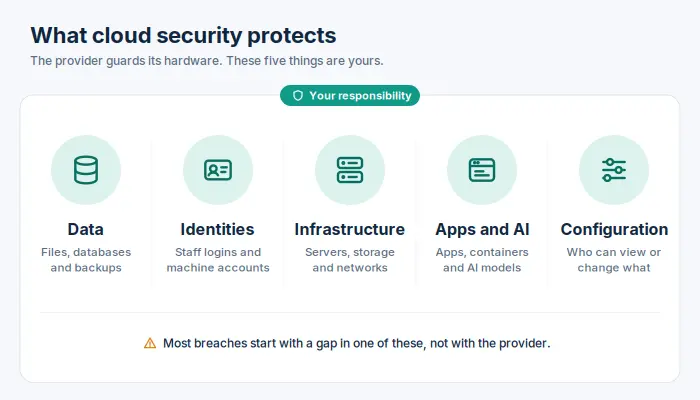
Cloud security keeps pace with that shift. Instead of guarding one entrance, it protects each piece on its own:
- Cloud data, such as files, databases, and backups
- Identities, both employee logins and machine accounts like API keys
- Cloud infrastructure, including virtual servers, storage, and private networks
- Apps, containers, and AI models built with newer cloud technologies
- The configuration that decides who can view or change cloud resources
In practice, this means three layers working together. Written security policies set the rules, such as “every admin signs in with a second factor.” Technical security controls enforce those rules automatically. Routine security measures, like access reviews and log checks, catch whatever gets past them.
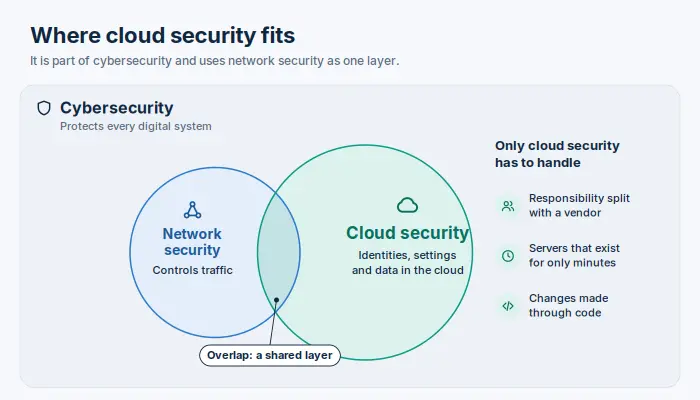
People often mix up these related terms, so here’s how they compare:
| Term | Covers | Main job |
|---|---|---|
| Cybersecurity | Every digital system | Defending any device, network, or data set from attack |
| Network security | Connections and traffic | Controlling what moves between systems |
| Cloud security | Provider-hosted services | Protecting identities, configurations, and data on shared, internet-facing platforms |
Cloud security falls under cybersecurity and uses network protection as one layer. It also handles problems the other two rarely face: responsibility split with a vendor, servers that exist for only minutes, and changes made through code rather than by hand.
A rental car makes a useful comparison. The rental company maintains the brakes and airbags. Locking the doors, choosing who drives, and keeping valuables out of sight are your job. If a laptop vanishes from an unlocked car, nobody blames the rental company.
What Is Security in Cloud Computing?
The phrase usually means the same thing as cloud security, but people use it in two senses. Sometimes it refers to the protection a cloud provider builds into its platform, such as encryption and access controls. Other times it describes how a customer uses those platforms safely.
The two senses depend on each other, because built-in protection only works once someone switches it on and sets it up correctly. That gap between cloud services and security configuration explains most real-world exposures. It applies across cloud computing environments of every size, from a single email suite to a sprawling multi-cloud estate.
Why Is Cloud Security Important?
Company data no longer sits in one server room. It’s spread across email, file sharing, payroll, and customer apps, and anyone with the right password can open them from a phone. That convenience helps attackers as much as employees.
Verizon’s 2026 Data Breach Investigations Report shows where the danger comes from:
- Exploited software flaws were the entry point for 31% of breaches, overtaking stolen logins as the top route for the first time.
- Stolen or misused credentials still appeared somewhere in 39% of breaches.
- Third parties were involved in 48% of breaches, a 60% jump in one year.
- Staff use of unapproved AI tools tripled to 45%, opening new paths for private data to leak.
In short, attackers have more doors to try, and every connected vendor or AI tool adds another one.
Regulators and clients add their own pressure. They expect you to protect cloud environments against unauthorized access, and security and compliance duties stay with you even when a vendor hosts the servers.
That’s what makes cloud security important: most security threats go after everyday gaps, and many security incidents begin with a setting someone could have fixed.
Ask yourself: would you notice if someone signed into your admin account from another country tonight? If not, the next sections will help.
How Does Cloud Security Work?
To see what cloud security work looks like in practice, follow one stolen password.
A scammer phishes a sales manager’s login. Several barriers now stand between that scammer and the company’s data:
- Multi-factor authentication (MFA): The account asks for a code from the manager’s phone. The scammer doesn’t have it, so the attempt fails there.
- Limited permissions: Now suppose the manager, tired of pop-ups, approves a fake prompt anyway. The account can still only view the sales pipeline. It can’t open payroll or delete backups.
- Network rules: Company databases accept connections only from approved systems, so a laptop overseas can’t reach them directly.
- Encryption: Stolen disks, backup copies, or intercepted traffic stay unreadable. Encryption won’t stop someone holding a valid login, which is why the other layers matter.
- Monitoring: A sign-in from an unusual country at 3 a.m. triggers an alert, and someone on the team locks the account within minutes.
- Recovery: If anything was deleted, a clean copy stored in a separate account brings it back.
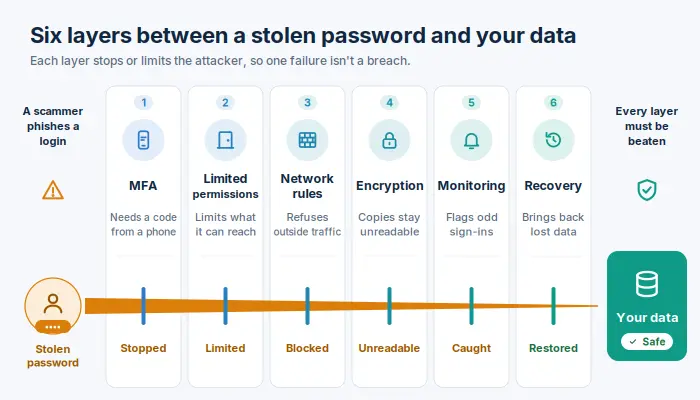
No single barrier is perfect. Cloud security focuses on stacking protections, so an intruder has to beat several in a row, and one failure doesn’t turn into a full breach.
These layers stay effective through a repeating loop:
- Prevent: set rules and limits before trouble starts.
- Detect: watch activity records for anything unusual.
- Respond: contain the problem quickly with a prepared plan.
- Recover: restore what was lost, then close the weakness that allowed it.
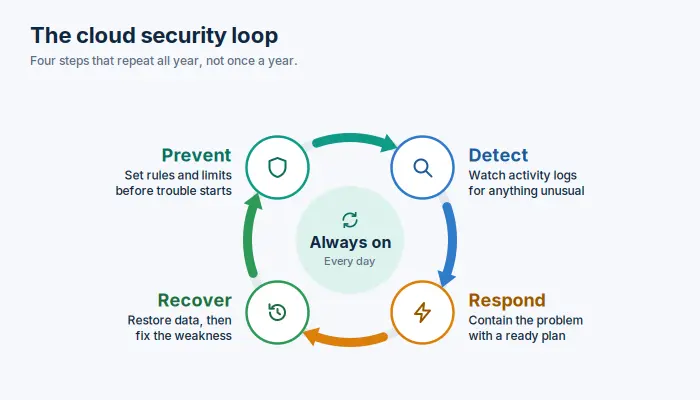
Cloud accounts change daily, with new users, apps, and storage, so security management has to run this loop continuously, not once a year. Routine security practices, like checking each quarter who holds admin rights, keep the layers from wearing down over time. Remember that your overall security is only as strong as its weakest layer.
Shared Responsibility Model in Cloud Computing
“We moved to Microsoft, so security is their job now.” That assumption causes a lot of breaches.
Providers protect their data centers, hardware, and core software. They can’t stop your team from sharing a folder publicly or leaving an old contractor’s account active. The provider secures the cloud itself, and you secure what you put in it.
Responsibilities by Cloud Service Model: IaaS, PaaS, and SaaS
Where that line falls depends on the cloud service you buy: rented servers (IaaS), a managed platform such as a hosted database (PaaS), or a ready-made app such as Microsoft 365 (SaaS).
| Who protects it? | IaaS | PaaS | SaaS |
|---|---|---|---|
| Data centers and hardware | Provider | Provider | Provider |
| Operating system | You | Provider | Provider |
| Application | You | You | Provider |
| Account settings | You | You | You |
| Data and user access | You | You | You |
The bottom two rows never change. Whatever you buy, your data and who can reach it stay with you.
One gray area catches many teams: backups. Many SaaS apps keep deleted files for only a limited time, which isn’t the same as a real backup.
Some providers, including Google Cloud, now offer stricter defaults and secure templates to help customers secure their cloud environments. That support helps, but accountability for your own settings stays with you. Before adopting any platform, spend ten minutes understanding the security split in its documentation.
Different Types of Cloud Environments and How to Secure Them
Plenty of businesses run several kinds of cloud without realizing it. Email lives in Microsoft 365, the website runs on AWS, and an old accounting system still sits on a server in the back office. Start by listing the types of cloud your company already uses, because each one needs slightly different protection.
| Environment | What it is | Watch out for | First fix |
|---|---|---|---|
| Public | Shared infrastructure rented from providers such as AWS or Azure | One wrong setting can expose data to the entire internet | Block public access by default |
| Private | Infrastructure reserved for one organization, on-site or hosted | You carry more of the patching and hardware upkeep | Keep a strict update schedule |
| Hybrid | Private systems linked to public services | The link between them becomes an easy route for attackers | Lock down and monitor that connection |
| Multi-cloud | Services from two or more providers | Each vendor handles permissions differently | Manage every login through one system |
A public cloud isn’t less safe than a private cloud. It moves faster, so mistakes spread faster too. In public cloud environments, new storage can go live, and go wrong, within seconds.
A hybrid cloud has a different weak point: the connection itself. The VPN tunnel or sync account that joins the office to the cloud often holds broad permissions and gets little oversight. Good hybrid cloud security treats that link as a prime target.
When your business works across multiple cloud platforms, resist building a separate approach for each. Apply one set of rules and review activity across cloud accounts from a single dashboard.
That way, the different types of cloud you rely on support each other instead of hiding problems. Knowing the types of cloud environments in your stack is the starting point.
Cloud Security vs On-Premises Security
Is the cloud safer than running your own servers? The location of the machines matters less than whether your team updates its habits for the move.
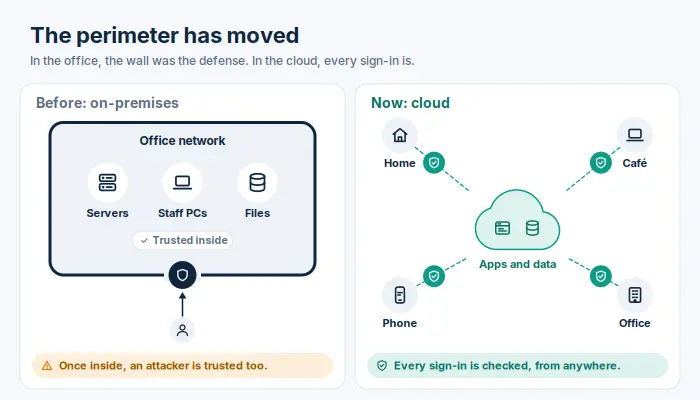
What still applies:
- Patching, backups, and minimal access rights matter just as much.
- Incident plans still need clear roles and regular practice runs.
What stops working:
- Trusting anything inside the office network. Cloud apps sit outside that network, so being “inside” proves nothing.
- Yearly reviews. In dynamic cloud environments, a server can appear, get exposed, and disappear between two audits.
- Hand-approved change requests for every setting. Engineers often update cloud setups through scripts, sometimes dozens of times a day.
What’s new to learn:
- Sign-ins and permissions replace the firewall as your main barrier.
- A wrong setting can cause as much damage as a software bug.
- Your monthly bill can warn you of trouble. A sudden jump may mean someone is secretly using your account to mine cryptocurrency.
The complexity of cloud platforms can feel overwhelming at first, but it rewards automation. Older approaches to security depended on people checking systems by hand. In the cloud, you write a rule once, such as “no storage may be public,” and the platform enforces it on every account automatically.
Benefits of Cloud Security
A ten-person company could never pay for round-the-clock guards, security engineers, and encryption hardware. A major provider includes much of that in the monthly bill. The catch is that several benefits of cloud protection only work after someone turns them on.
| Benefit | What you get | How to make sure you have it |
|---|---|---|
| Expert protection | Provider teams guard facilities and platforms 24/7 | Ask vendors for independent audit reports, such as SOC 2 or ISO 27001, before you sign |
| A complete inventory | Visibility into cloud assets a spreadsheet can’t match: every server, storage folder, and user | Open your provider’s security dashboard, which many teams never set up |
| Built-in encryption | Stored data stays scrambled without extra equipment | Check that encryption covers backups too, and decide who controls the keys |
| Faster recovery | Copies in a second region keep the business running if one site fails | Run a restore drill twice a year |
| Protection that scales | Small firms get the same platform defenses as large enterprises | Check what your current plan includes before buying add-ons |
What cloud security offers a small team is enterprise-level reach: the speed of cloud computing while mitigating most everyday risks. But no vendor’s security offers much value on autopilot. Cloud security measures help only when someone owns them, reviews them, and acts on the alerts they raise.
Key Components of Cloud Security
Think of the components of cloud security as eight separate jobs. Skip one, and the others end up carrying more weight than they were built for. Each area below covers its main purpose and one check you can run this week.
Identity and Access Management (IAM)
Every request for access to cloud services starts with an identity, and many of those identities aren’t people. Service accounts, API keys, and automation scripts often outnumber employees, and nobody reviews them.
Try this: count how many accounts hold full administrator rights. If the number is more than a handful, trim it. Then look for access keys unused in the last 90 days and delete them.
Data Security and Encryption
Good data security starts with an awkward question: where do copies of your customer data actually live? Spreadsheet exports, old test databases, and shared drives tend to multiply quietly.
- Find sensitive data before deciding how to protect it.
- Use fake or masked records in testing, never real customer details.
- Decide who controls the encryption keys: the provider or your team.
Network Security
Most teams focus on blocking incoming traffic and forget about outgoing traffic. Restricting what your servers can send out makes it much harder for an intruder to move stolen files.
Also close remote-access ports that face the internet. Automated scanners find them within hours.
Workload Security
Virtual machines, containers, and serverless functions all run your code, and each can carry outdated software.
Cloud workload protection means building from a clean, current base image, scanning it before release, and giving each function only the permissions its task needs.
Application and API Security
Here’s a simple check: call one of your APIs without logging in, then again as a regular user. If either response shows more data than the screen displays, you’ve found a leak. Keep passwords and keys out of code entirely, and store them in a dedicated secrets manager.
Visibility, Logging, and Threat Detection
Attackers often switch off logging first. Set an alert for that exact event, and store log records where intruders can’t erase them.
A security information and event management (SIEM) system gathers those records in one place, so security teams can spot patterns across all your cloud assets.
Governance and Compliance
Tag every resource with an owner’s name. Servers and storage without an owner are the ones nobody patches or deletes. Central policies can enforce security rules before a risky change goes live, and they make compliance in the cloud far easier to prove when an auditor asks.
Backup, Disaster Recovery, and Incident Response
Write short response plans for your three most likely emergencies, for example, a leaked key, a hijacked account, and ransomware.
For each plan, list who acts first, how to reach your provider’s support team, and how many hours of lost data the business can tolerate. Keep a printed copy, since your laptop might be the device under attack.
Cloud Security Risks and Challenges
A risk is something that can hurt you. A challenge is what makes that risk hard to fix. Keeping the two apart makes cloud security risks and challenges easier to tackle, because each needs a different response.
Top Cloud Security Risks
The Cloud Security Alliance’s 2024 Top Threats report ranked misconfigured settings, weak identity controls, and insecure APIs as the three biggest dangers. Several provider-side concerns dropped off its list, which shows where most cloud security risks now come from: the customer side.
Each of these security risks shows early warning signs if you know where to look:
| Risk | Early warning sign | Quick defense |
|---|---|---|
| Misconfigured settings | Storage or databases open without a login | Block public access across all accounts |
| Stolen logins | Sign-ins from new countries, or login prompts nobody requested | Phishing-resistant multi-factor sign-in |
| Exposed APIs | Unusual traffic spikes on data endpoints | Require login and limit request rates |
| Unpatched software | Internet-facing servers running old versions | Patch public-facing systems first |
| Risky connected apps | Third-party tools with “read all mail” permission | Review connected apps every quarter |
| Ransomware | Mass file changes or attempts to delete backups | Backups that can’t be altered, kept in a separate account |
| Hijacked accounts | Cloud charges spiking for no clear reason | Budget alerts |
| Shadow AI | Company data pasted into unapproved AI tools | An approved AI tool and a clear usage policy |
Common Cloud Security Challenges
Most cloud security challenges come from people and processes, not missing technology. The common challenges of cloud security include:
- Too few specialists: Few people understand both security and cloud engineering well.
- Alert overload: When tools raise hundreds of warnings a day, the real threat gets lost.
- Constant change: Developers ship updates daily, and manual reviews can’t keep up.
- Permission creep: Access rights tend to grow over time and rarely get removed.
- Multiple providers: Each platform uses different tools and settings.
- Cross-border rules: Data stored in several countries may fall under several sets of laws.
These security challenges get easier once you automate routine checks and assign responsibility for each account. Problems hidden within cloud environments tend to stay hidden until someone is clearly responsible for finding them.
Cloud Security Examples
Security becomes easier to understand when you see it at work. The first set of examples shows protections stopping ordinary mistakes. The second shows two real companies that paid for gaps.
Everyday Examples of Cloud Security in Action
The shared pricing sheet. A marketing intern shares a spreadsheet with “anyone with the link.” A sharing policy limits links to company accounts, so the file never reaches a competitor’s inbox.
The key in the code. A developer accidentally uploads an access key to a public code repository. Automated scanning flags it almost immediately , and the team cancels the key before bots can use it.
The flash-sale bot attack. During a holiday sale, bots try thousands of stolen passwords on a store’s login page. A web application firewall spots the pattern and blocks the traffic while real shoppers keep buying.
The contractor’s last day. A freelancer’s contract ends on Friday. Because every app uses one company login, switching off that single account removes access to email, files, and billing at once.
None of these required expensive tools, only settings someone chose in advance. That’s how cloud security measures usually earn their keep: quietly.
Real-World Cloud Security Breaches and Lessons Learned
Capital One, 2019. An attacker exploited a misconfigured web application firewall to reach data the bank stored on AWS, affecting about 100 million people in the U.S. and 6 million in Canada. In 2020, U.S. regulators fined the bank $80 million, pointing to weak risk assessment before it moved major systems to the cloud.
Lesson: check your setup before migrating, not after.
Snowflake customer accounts, 2024. A criminal group broke into the Snowflake accounts of many organizations, and around 165 were warned they might be affected. The attackers didn’t hack Snowflake itself.
They used passwords stolen by malware, some dating back to 2020. The affected accounts had three gaps in common: no multi-factor sign-in, passwords that were never changed, and no limits on where logins could come from.
Lesson: the platform held up, but its customers’ login protections didn’t.
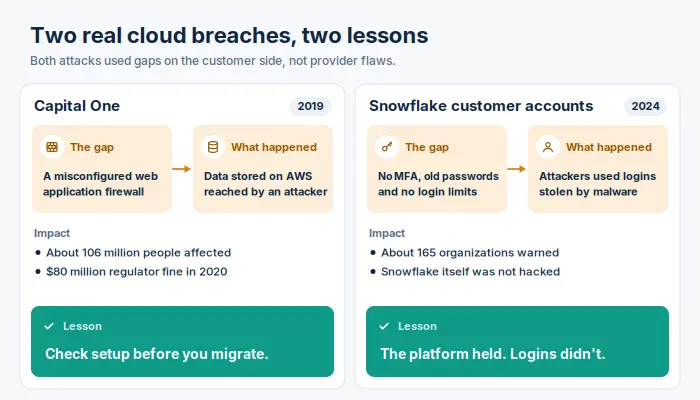
Both cases show that strong cloud security measures don’t need to be exotic. Checking settings before launch, turning on MFA, and changing passwords regularly would have helped safeguard cloud environments in each case.
What Types of Cloud Security Solutions Are Available?
Vendor websites make this market look like alphabet soup. An easier way in is to start with the problem that worries you most, then match it to a category. Here are the main types of cloud security solutions, sorted by the job each one does.
| If your worry is… | Look at | What it does |
|---|---|---|
| Settings nobody has checked | Cloud security posture management (CSPM) | Scans cloud environments for misconfigurations, such as open storage |
| Vulnerable servers and containers | Cloud workload protection platform (CWPP) | Finds outdated software and malware in running systems |
| Too many people with too much access | Cloud infrastructure entitlement management (CIEM) | Maps permissions and shows which ones go unused |
| Not knowing where sensitive records live | Data security posture management (DSPM) | Locates personal and financial data and shows how exposed it is |
| Staff using unapproved apps | Cloud access security brokers (CASB) | Enforce rules on how employees use SaaS apps |
| Juggling several separate dashboards | Cloud native application protection platform (CNAPP) | Combines several of these tools into one view, from code to live systems |
| Spotting an attack in progress | SIEM and cloud detection and response | Collects activity records and alerts on suspicious behavior |
| Passwords and keys scattered in code | Secrets manager | Stores credentials safely and replaces them on a schedule |
| Bots attacking your website | Web application firewall (WAF) | Filters harmful traffic before it reaches your app |
Other cloud security solutions are available for narrower needs, such as protecting AI models or Kubernetes clusters. The categories above cover most businesses.
Which Cloud Security Tools Do You Need?
Start with the tools your provider already offers. AWS Security Hub and Microsoft Defender for Cloud cover a lot of ground, though some features cost extra.
- Small team, one provider: built-in tools, multi-factor sign-in, a secrets manager, and backups.
- Growing company, two or more providers: add a CSPM or a full cloud security platform to monitor cloud environments from one screen.
- Regulated or large organization: add DSPM, a SIEM, and round-the-clock monitoring, either in-house or through a managed provider.
Adding security tools doesn’t automatically make you safer. Each product brings more alerts to review and more settings to maintain, so buy cloud security tools only when you’ve spotted a clear gap.
How to Choose the Right Cloud Security Solution?
Run a two-week trial on your own accounts before you sign anything, and ask:
- Does it cover every provider and app we use?
- How many alerts did it raise in the first week, and how many turned out to be real?
- Does it need software installed on each server, or does it connect directly to our provider?
- How will the price change as we grow?
- Can we export our data if we cancel?
- Can the vendor show its own SOC 2 report or ISO 27001 certificate?
The best cloud security solution is the one your team actually uses every day.
Cloud Security for Small Business
Bots don’t check company size before attacking. They try every login they find, and a five-person office with reused passwords is an easy win. Small firms can also give attackers a path into the larger clients they serve.
Robust cloud security for a small team takes more time than money.
One afternoon of setup:
- Turn on two-step sign-in, starting with email and banking.
- Give each employee a password manager.
- Switch on the security settings already included in your business plan.
- Back up email and files with a separate service, then test a restore.
Fifteen minutes each month:
- Remove accounts belonging to people who have left.
- Review which outside apps can read your data.
- Check your bills for unexpected charges.
If nobody on your team has time for this, a managed service provider can handle it for a monthly fee. Many cyber insurers also ask for MFA and backups before offering coverage. A little effort keeps secure cloud environments within reach of any small business.
Cloud Security Strategies That Work
Tools tell you what to buy. A strategy tells you what you’re protecting, from whom, and in what order. Teams that skip that second step often end up with expensive software and the same old gaps.
Three cloud security strategies work well for companies of any size:
- Protect identities first: Most attacks start with a login, so give identity your first budget and your first hour of attention. That means one sign-in system for staff, minimal permissions, and short-lived keys for software.
- Build checks into everyday work: Instead of making developers wait for a manual review, scan code and settings automatically with every update. When you integrate security into existing routines, problems get fixed early, while they’re still cheap.
- Let automation handle the repetitive work: People decide the rules, and software applies them. Automatic fixes for common issues, such as closing public storage, free your team to investigate the alerts that are actually unusual.
Zero Trust Security Strategy
Think of a hotel keycard. It opens only your room, only during your stay, and the front desk can cancel it instantly. Walking through the lobby doesn’t unlock every door.
A zero trust security strategy applies the same idea to the cloud. NIST describes the model in Special Publication 800-207, and its core principles are simple:
- Verify every request, even ones from inside the company.
- Give the least access needed, for the shortest time possible.
- Plan as if an attacker is already inside, and limit how far they could move.
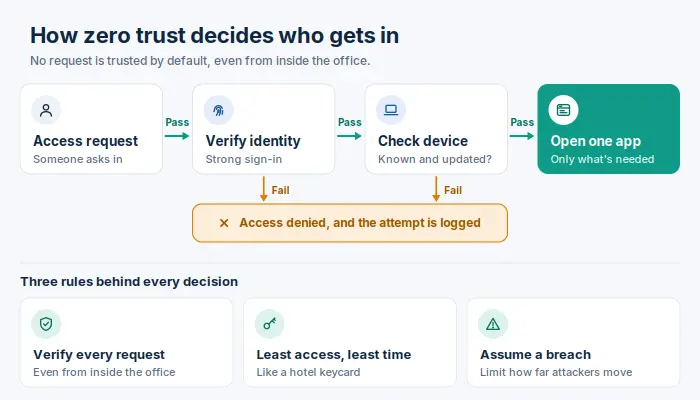
You don’t have to change everything at once. Most organizations start with strong sign-in and device checks, then gradually replace broad VPN access with app-by-app permissions.
Whatever approach to cloud security you choose, keep it to one page and review it every year. The most comprehensive cloud security plan isn’t the longest one. Effective cloud security comes from a short plan your team actually follows.
Cloud Security Frameworks and Compliance
Your provider’s certificates prove that it runs a tight operation. They don’t prove anything about your accounts, users, or data, and auditors will ask about all three.
A framework gives you a ready-made structure for that evidence. The NIST Cybersecurity Framework 2.0 is a solid, free place to start. It groups security work into six functions:
| Function | Cloud example |
|---|---|
| Govern | Make one person accountable for each account |
| Identify | List where sensitive data lives |
| Protect | Enforce MFA on every account |
| Detect | Flag sign-ins from unfamiliar locations |
| Respond | Follow a playbook for hijacked accounts |
| Recover | Restore from tested backups |
Which additional framework you need usually depends on who’s asking. Enterprise clients often request a SOC 2 report or ISO/IEC 27001 certification. Laws such as GDPR, HIPAA, and PCI DSS apply depending on the data you handle and where you operate.
Compliance drifts every time someone changes a setting. Book regular security assessments and audits, and run automated checks in between, to maintain a strong security posture all year.
Cloud Security Best Practices
Most lists of cloud security best practices say roughly the same things. Knowing them is easy. Keeping them up after a busy quarter is where teams slip. Here are eight core habits, along with the excuse that usually gets each one skipped:
| Habit | Common excuse |
|---|---|
| Passkeys or security keys for every login | “Staff will complain” |
| Minimum permissions for each role | “Full admin rights are quicker” |
| Encryption for stored and transmitted data | “The provider handles that automatically” |
| Central activity logging | “We’ll turn it on after launch” |
| Guardrails that block risky settings | “They’ll slow the developers down” |
| Regular patching and scanning | “That server is only temporary” |
| Scheduled restore drills | “The backup report says it worked” |
| Ongoing staff training | “We covered that during onboarding” |
Treat each best practice as a recurring calendar task assigned to one person, not a one-time project. Cloud security practices nobody is accountable for fade within a few months.
Implementing Cloud Security: A 90-Day Roadmap
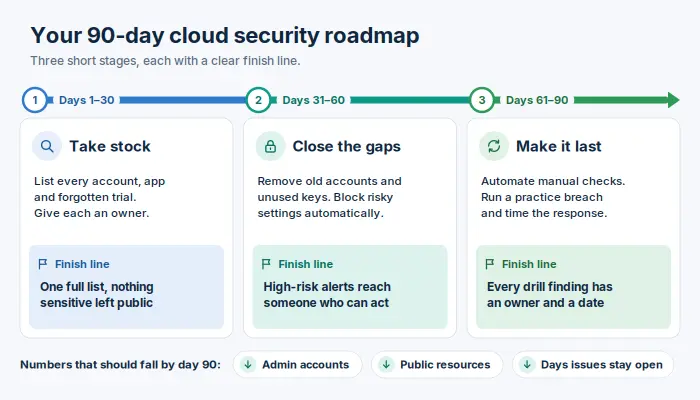
Implementing cloud security goes better in short stages with clear finish lines than as one large project that never quite ends. Treat each 30-day block below as complete only when its finish line is met.
Days 1–30: Take stock: Find every account, subscription, and app your company uses, including the forgotten trial accounts. Give each one an owner.
Finish line: a single, complete list, with nothing sensitive reachable from the open internet.
Days 31–60: Close the gaps: Remove old accounts and unused keys, then apply account-wide rules that block risky settings before anyone can create them.
Finish line: high-risk alerts reach a real person who knows what to do next.
Days 61–90: Make it last: Turn your manual checks into automatic ones. Then run a practice breach, such as “a customer database was just found open to the public,” and time how long your team takes to contain it.
Finish line: every weakness the drill exposed has an owner and a fix date.
Track three numbers on day one and again on day 90: how many admin accounts exist, how many resources are publicly exposed, and how many days critical issues stay open. Seeing those numbers improve is the easiest way to show leadership that the work paid off.
If your team is still implementing cloud services, run this plan alongside the migration rather than after it. Security added after launch costs more and gets skipped more often.
Future of Cloud Security: Key Trends to Watch
Predictions age quickly, so each trend below comes with something you can do now, whatever happens next. These trends in cloud security are already showing up in real incidents and buying decisions.
AI agents with real permissions. Companies now give AI assistants access to email, files, and cloud accounts so they can act on staff’s behalf. An agent that can delete data needs the same limits as an employee who can.
Act now: list every AI tool connected to company systems and cut each one back to the access its task requires.
Automated traffic outpacing people. Verizon’s 2026 report found that traffic from AI bots is growing about 21% a month, while human traffic has stayed flat. Websites and APIs will face more automated probing every year.
Act now: add rate limits and bot filtering to anything public-facing.
Machine accounts outnumbering staff. Software keys, service accounts, and agents keep multiplying, and few get regular reviews.
Act now: include machine accounts in your quarterly access checks.
Encryption built for quantum computers. NIST published its first post-quantum encryption standards in 2024. Attackers can steal encrypted data today and wait until future computers can break it.
Act now: identify data that must stay secret for ten years or more, and ask your vendors about their migration plans.
Stricter data location rules. More countries require certain data to stay within their borders.
Act now: record which region each data store uses.
The future of cloud security will likely favor teams that know exactly what they run and who, or what, can touch it.
Conclusion
Strip away the acronyms, and every one of the components of cloud protection in this guide answers two questions: who can get in, and how fast can you recover when something goes wrong?
Teams that can answer both without guessing already avoid most of the incidents described above. Teams that can’t don’t need a new product first. They need an hour with their account list and a willingness to delete what nobody owns.
Start there this week. Then pick one section of this guide each month and turn it into a habit. By this time next year, your cloud will be harder to break into than most.